
Can I run with just my Apple Watch? A valid question and one we running coaches receive weekly. Yes, you totally can. But there are a few things worth considering.

If you’re not big on gear (especially when it comes to tech), you’ll be happy to know you really only need one watch to support your training. And for many people, the Apple Watch fits the bill.
With so many good running watches on the market, it ultimately comes down to what matters most to you. But if you’re already wearing an Apple Watch every day, the good news is you don’t have to switch it when you want to head out the door or hop on the treadmill to run.
Apple has always had the goal to be the best when it comes to smartwatches and with the Apple Watch Ultra, it’s finally starting to get a little more serious in the running world. Of course it’s a much higher price tag than the standard Apple most of you are using!!
That said, it’s important to remember that every Apple Watch is built as a smartwatch first and a fitness tracker second.
Recent updates include many features we’re used to seeing from Garmin and COROS, with just a few gaps. And while it’s come a long way, it’s still not quite the same as wearing a watch designed specifically for endurance athletes.
So, let’s dig into how to make the most of your Apple Watch for running and maybe (just maybe) nudge you towards considering why a running watch could be worth it.
Can I Run With Just An Apple Watch?
Let’s just break this down right away! Here is who will do just fine using an Apple watch 10 no matter the pace or distance, reminder that the older the Apple watches will have most of the same features, but we see GPS improve with newer models.
- You aren’t looking for super accurate distance measurements (3 miles vs 3.1 doesn’t bug you)
- You love having all of your data in one watch (i.e. closing your rings, your steps, your sleep) and you like the Apple better than any of the running watches with those features
- Keeping the watch charged isn’t an issue (it runs down faster during workouts)
- Runs are under 3 hours
- Maps aren’t a necessary tool
Again the Apple Ultra is a whole different beast with a whole different price point which provides a much bigger screen, phenomenal GPS and other features that allow it to stack up to a running watch.
6 Ways to Transform Your Apple Watch Into A Proper Running Watch
If you already have an Apple Watch, it can absolutely support your running journey; you just need to know how to make the most of it.
While the battery life might not make it through a longer race (more on that below), it still covers the basics and will help you stay consistent with training. And consistency is a much bigger predictor of success than what watch you use!
Let’s optimize your Apple Watch for running.
1. Calibrate Your Watch
Calibrating your watch isn’t just a treadmill thing. According to Apple, doing this during your outdoor runs or even walks can actually help improve the accuracy of your distance tracking and stride measurements.
All it takes is heading outside for at least a 20-minute run on a relatively flat route. That gives the watch enough consistent data to understand better how you move.
If your pacing ever starts to feel off or the distance doesn’t seem right, you can always go into your settings and select Reset Fitness Calibration Data to start fresh.
Remember, it’s technology, so there’s always going to be some hiccups!
2. Setting Up Heart Rate Zones
Apple Health uses 5 zones for heart rate. We don’t want to use the automated numbers it provides.
Instead you want to follow these steps:
- Complete a workout to find your max heart rate
- Utilize the Kravonen calculator to find your zones
- Go to the Settings app
 on your Apple Watch.
 - Go to Workout > Heart Rate Zones.
- Tap Manual, tap zone 2, 3, or 4, then enter lower and upper limits.
Once your zones are created, you’ll be able to track your effort during your workouts. You can use the dial on the watch to toggle between screens.
While running, you’ll be able to view the zone, heart rate, time in current zone, and your average HR throughout.
3. Customize Your Workout Screens
One of the features is being able to customize the data fields that show up during each workout. That means you can choose exactly what you want to see, like pace, heart, and distance, right on your wrist while you’re running.
But Coach Amanda wasn’t totally in love with this on the Apple Ultra Watch. She found it a little difficult to quickly look at the data while running. And for her trail runs, she noticed she couldn’t see some data, like how much elevation she gained. 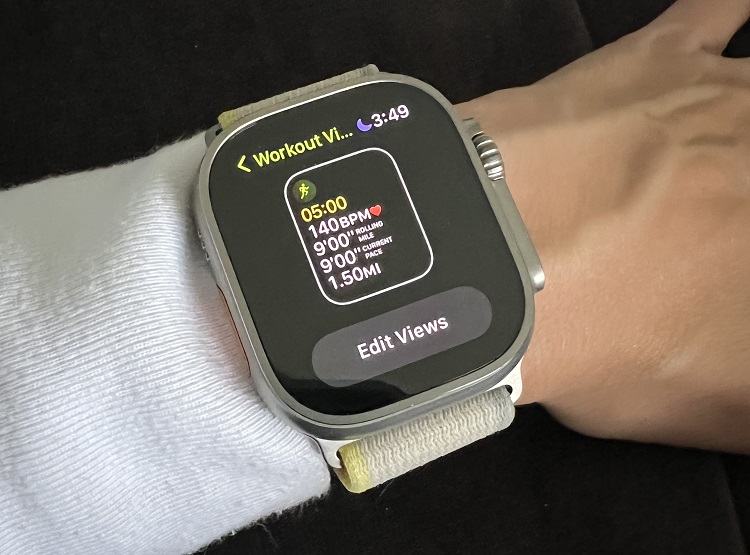 But if you’re not someone looking for the nitty gritty data of every workout, this setup is perfect. It’s simple and easy to use, which, for most runners, is more than enough to stay on track and feel good about their progress.
4. Turn Auto Pause On
Raise your hand if you’ve ever hit pause on your run and then totally forgot to hit resume.
Whether you’re stopping at a traffic light, snapping a photo of some wildflowers, or need a potty stop, it’s easy to get distracted and forget to tap that resume button.
Save yourself the disappointment and turn on auto-pause. It’ll automatically pause your workout when you stop moving and restart once you’re running again. No more missed miles or weird gaps in your pacing.
5. Create Custom Workouts
If you’re looking for a little extra motivation during your runs, the Apple Watch makes it pretty easy to stay on track. You can create custom running workouts directly on your watch and even set a goal, whether that’s distance, time pace, or even heart rate zones.
It’s a nice way to turn your run into something a little more structured. But hey, we love those just run for fun or by feel days too!

You can build in your warm-up, the main workout, and a cool-down all in one go. And if you want to add in some time for a dynamic warm-up before you start, you can do that too.
If your main goal is just to be consistent, you can set your activity goal and see how many rings you can close with your runs!
Working with a coach? Most apps like FinalSurge and TrainingPeaks will sync directly to your Apple Watch so that you can follow the workouts your coach has pre-assigned in the workout builders.
Of course, you can also connect to Strava to keep track of your training, race day PRs, and interact with the running community.
6. Get Rid of Distractions
One of the downsides of running with an Apple Watch is that it’s connected to everything. Texts, emails, social media, and if you’re anything like me, sometimes it’s hard not to sneak a peek or even reply mid-run.
That’s why one of the best features Apple has added (besides being able to mark a text as unread) is focus mode. And if you haven’t used it yet, trust me, it’s a total game-changer.
You can create a custom focus just for running, so you’re not getting bombarded with notifications while trying to nail a workout or just zone out. You can silence everything or allow only certain people or apps through.
Running should be your time. It’s a break from scrolling on your phone and constantly being pinged. Trust me, those messages will still be there when you’re done.
5 Reasons Running Watches Still Beat Apple Watch
If you’re starting to go after bigger training goals like your first marathon, chasing a PR, or maybe even running an ultra, let’s look at why we recommend switching. Running watches are designed with a different goal in mind than an Apple watch, and some of them are pretty important.

Here are a few reasons you might want to consider swapping your Apple Watch for one designed specifically with runners in mind.
1. Battery Life
There’s nothing worse than being halfway through a marathon, or worse, an ultra, and your watch dies. Because if it didn’t upload to Strava, did it even happen? And how will you get any kudos?
Jokes aside, the battery life is one of the biggest complaints we hear about the Apple Watch. But if you’re wearing the Apple Watch Ultra, Apple claims it can easily handle a 3-6 hour marathon while using GPS and still have battery to spare. That’s assuming you started with a full charge and you’re also not using it to listen to music, track your location, and answer texts mid-run.
If you’re wearing an older Apple Watch model, though, the battery just isn’t built for long endurance events. This is exactly where Garmin and especially COROS shine.
You can run a marathon, maybe even a 50k, and still have enough battery to get through a few days of regular use before needing to recharge.
2. Better GPS (i.e. better distance tracking)
Have you seen those reels where runners are holding their running watches up to the sky because we all think it’ll help find the GPS satellites faster?
Most running watches are equipped with multiple satellite systems like GPS, Galileo, and GLONASS to improve accuracy. Once you hit start, you’ll be able to see if you’re connected or not. You’ll probably even get a notification if the GPS drops out if you run under a bridge or in a congested city.
Unfortunately, Apple’s watches only use dual-frequency GPS. And what makes it even more annoying is you won’t know if you’re connected before heading out for your run. So while it’ll track your distance, it might not be as precise as you think.
**The only exception to this is the Apple Ultra, which uses more satellites and some additional software to help ensure you’re getting better GPS even in downtown areas. But as we said, it’s a hefty price tag!
3. More Accurate Data
If you’re someone who trains by heart rate, the Apple Watch might not be the best watch for you. It uses the standard 220 minus your age formula to calculate your HR zones….and that’s it. As your fitness changes, Apple won’t automatically update or adapt those zones based on your training.
To keep things accurate, you’ll need to manually adjust your max heart rate in the Health or watch app. But that means you’d have to know your max HR or have results from a lactate threshold test.
This is where a running watch is the preferred option. They track your workouts and automatically update your HR and pace zones as your fitness improves or drops. That means your training zones stay in sync with where you’re actually at, so you’re putting in the right effort for your training goals.
4. Watch Features
Most running watches are going to have a few buttons, each with its job. One of the most useful features is the ability to mark laps or splits during intervals or a race. It’s super easy, just hit the button and keep running. Over time, it basically becomes muscle memory.
With the Apple Watch, things get a little trickier. You can still manually mark splits, but it requires a double-tap on the screen.
That means timing it just right, pressing with enough pressure, and hoping your fingers aren’t too sweaty. Honestly, I think that it’s a lot of effort for something that should feel super easy.
And if you’re a trail runner who likes to follow a map on your watch, Apple is not making that easy either.
Having access to a map is pretty standard now on Garmin and COROS watches, but for Apple, you need to download a separate app just for maps and keep it open alongside your workout, which is going to drain the battery even faster!
So, unless you don’t mind scrolling between apps mid-run (with fingers that may be frozen or dripping with sweat), this setup is probably not the greatest.
5. Simplicity of Training Plans and Workouts
The Apple Workout app lets you build custom workouts right on your watch. You can set up intervals, recovery blocks, and even goal paces, which is perfect if you already know what your workout looks like.
But if you’re hoping to follow a training plan or want a library of pre-set workouts, you’ll need to use a 3rd party app like Nike Run Club. Apple doesn’t have a built-in coaching system or training plan library (at least yet!).
Garmin, COROS, and even Polar have all added built-in “coach” features and include in their apps ready-to-go training plans. You can also build custom workouts or sync structured training directly from your coach using platforms like FinalSurge or TrainingPeaks. Meaning less work for you and no need to download yet another app.
You can sorta follow workouts on your Apple Watch, but if you’re someone who wants a little more structure or just wants to download something pre-created, a running watch may make training a little easier.
Every runner has their preferences when it comes to gear, training data, and goals. That’s the great thing about having so many options, sure, it can feel overwhelming at times, but it also means there’s something out there that’s going to fit you and your goals.
Hopefully, this article gave you a better idea of how to make the most of your Apple Watch for running and maybe even made you a little curious about considering a running watch in the future.



 Altra Olympus 275 Review | Great Shoe, Terrible Fit
Reviewing the Apple Watch as a running watch without icluding the top Running Apps, e.g., WorkOutDoors, Runna or Ahtlytics, vs just the vanilla Apple running app is completely missing the one of the greatest features of the Apple Ecosystem. If you want a set of features and capabilities, they are not tied to the watch and watchOS you bought and reliant on that company alone to innovate. Just go pick one of the apps. WorkOutDoors, for example, answers most if not all, of your listed weaknesses (battery life excluded!!) for the Apple watch, and it can run on the cheaper Apple watches.
As per the previous comment, the greatest thing about apple is the ecosystem. I bought a plan from training peaks and this synchs directly with the workout app – so every small change came through with the unique workout for that day. It does it a whole lot better than the Garmin apps which are so terribly clunky. Battery life is now my only issue with the Apple watch but I also like the way I don’t need my phone with me when I go running now – my apple watch can also answer calls. Not something I can do with Garmin.